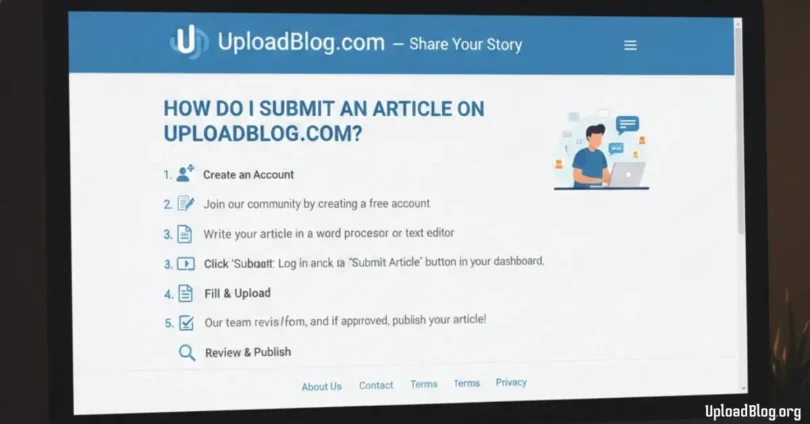
If you are wondering “how do I submit an article on UploadBlog.com?”, then this simple guide will help you understand everything step by step. UploadBlog.com is a user friendly platform where anyone can share their ideas, stories, or helpful information with the world.
Submitting an article is easy, even for beginners, and you only need a few minutes to get started. In this guide, you will learn how to create an account, write your article, and finally submit it for approval in a clear and simple way.
Create Your UploadBlog.com Account
Before you submit any article, you must create an account on UploadBlog.com. This account is important because it keeps all your articles, drafts, and settings safe.
How to create your account:
- Open your browser
- Type “UploadBlog.com”
- Click on the Sign Up button
- Enter your name
- Enter your email address
- Create a strong password
- Click Create Account
Tips for choosing a strong password:
- Use letters + numbers
- Add special characters
- Make it at least 8–10 characters long
- Do not use your name or birth year
Once your account is created, move to the next step email verification.
Verify Your Email to Unlock Your Dashboard
After signing up, UploadBlog.com sends you a verification email. This is important because unverified accounts cannot submit articles.
- Open your email inbox
- Find the message from UploadBlog.com
- Click the verification link
- Wait 2–5 seconds for confirmation
Once done, your account is unlocked and you can access your dashboard.
Explore the UploadBlog Writer Dashboard
The dashboard is the heart of your writer account. From here, you can write, edit, and manage everything.
- New Post
- All Posts
- Drafts
- Profile Settings
- Notifications
- Submission Status
Spend at least 5 minutes exploring the dashboard. This helps you know where all the tools are located.
Understand the UploadBlog Article Rules
Before writing your article, you must understand the platform rules. UploadBlog.com has rules to maintain quality.
- Article must be original
- No plagiarism
- Minimum word count: usually 800–1000 words
- No harmful content
- No copied images
- Grammar should be correct
- Clear and simple English preferred
If you follow these rules, your article approval chances increase a lot.
Choose a Topic That UploadBlog Accepts
Choosing the right topic is very important. If your topic is too common or low-quality, it may not get accepted.
Good topic categories:
- Technology
- Blogging
- How-to guides
- Health tips
- Education
- Digital marketing
- Travel guides
- Useful lists
- Lifestyle tips
- Trending topics
Tips to choose a good topic:
- Pick something you know about
- Make it helpful
- Make it interesting
- Choose a title people search online
Example topics:
- How to start a blog
- How to earn money online
- Best health tips for beginners
- How to fix slow internet
Choosing a strong topic is the base of a good article.
Start a New Article Draft on the Platform
Once you pick your topic, it’s time to open the editor.
How to start:
- Click New Post
- A blank editor will open
- Type your title
- Start writing your article
The editor is simple and works like Microsoft Word.
Write Your Article Using Simple and Clear English
Good writing is simple writing. UploadBlog prefers easy English so readers from all levels can understand.
Tips for writing simple English:
- Use short sentences
- Avoid hard vocabulary
- Write like you’re teaching a child
- Keep paragraphs short
- Explain everything clearly
You should include:
- Introduction
- Body content
- Bullet points
- Headings
- Steps
- Tips
- Conclusion
The clearer your writing, the faster you will get approval.
Add Headings, Images, and Internal Links
Formatting your article makes it attractive and easy to read.
Add headings:
- Use H2 for main headings
- Use H3 for sub headings
Add images:
- Only use copyright-free images
- You can use sites like:
- Pixabay
- Unsplash
- Pexels
Add internal links:
- Link to other UploadBlog articles
- Link to helpful resources
Good formatting improves SEO and helps your article rank better on Google.
Check Your Article for Grammar and Plagiarism
Checking your article is very important because even small mistakes can cause rejection.
Tools you can use:
- Grammarly
- QuillBot (for grammar)
- SmallSEOTools (for plagiarism check)
- Duplichecker
Check for:
- Spelling errors
- Missing commas
- Long sentences
- Copied text
- Repeated lines
- Wrong format
A clean, error free article has the highest chance of approval.
Preview Your Article Before Submitting
Always preview before you submit.
- Headings
- Paragraph spacing
- Image alignment
- Broken links
- Missing points
- Text too close together
Preview helps you fix your article before final submission.
Click the Submit Button to Send Your Article
Once everything looks perfect:
- Click Submit for Review
- Wait 2–3 seconds
- You will see a confirmation message
Your article is now in the review queue.
Wait for the Review and Approval Notification
Every submitted article goes through a review process.
Review includes:
- Checking grammar
- Checking formatting
- Checking plagiarism
- Checking quality
- Checking topic relevance
Time for approval:
- Usually 12–48 hours
- Sometimes faster
- Sometimes slower based on load
Do not submit the same article again during review.
Common FAQs About How Do I Submit An Article On UploadBlog.com?
Some faqs of how do i submit an article on uploadblog.com?
Do I need an account to submit an article?
Yes, you must create an account first.
Is article submission free?
Yes, submitting articles on UploadBlog.com is completely free.
How long should my article be?
At least 800–1000 words, but longer articles get better approval chances.
Can I copy articles from other websites?
No, UploadBlog does not accept copied content.
How long does approval take?
Usually 12–48 hours.
Can I edit my article after submission?
You can edit only if the editor sends a request.
Which language should I use?
Simple English is recommended for the best results.
Can I add images?
Yes, but they must be copyright free.
Can I submit more than one article?
Yes, you can submit unlimited articles.
How will I know if my article is approved?
You will receive a notification on your dashboard and email.
Conclusion
Submitting an article on UploadBlog.com is easy when you follow the right steps. You have now learned everything from creating your account to getting your article approved.
Write clearly, follow the rules, add headings, use images, check everything, and then click submit. If you practice regularly, you will become better and publish many articles on the platform.