When you start blogging on UploadBlog.com, one of the most important things to understand is categories. UploadBlog.com categories help you organize your posts, making it easier for readers to find what they are looking for. Whether you write about technology, health, lifestyle, or entertainment, using the right categories ensures your blog stays neat and professional.
Why Categories are Important on UploadBlog.com
UploadBlog.com Categories are not just labels they are essential for organizing content, improving user experience, and enhancing SEO. Here’s why they matter:
- Organized Blog Structure: Categories help group similar posts, making it easier for readers to find content.
- Better User Experience: Readers can navigate your blog easily without scrolling through unrelated posts.
- Improved SEO: Search engines index blogs more efficiently when content is properly categorized.
- Time Saving: Both bloggers and readers save time when posts are sorted under correct categories.
Types of Categories on UploadBlog.com
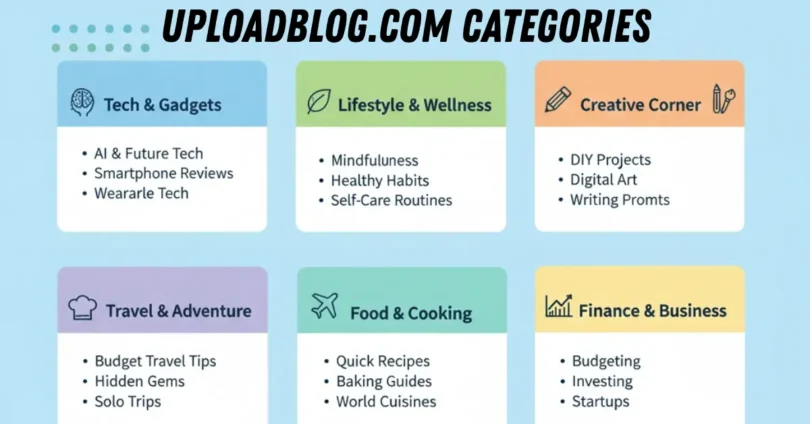
UploadBlog.com offers a wide range of categories to suit every type of blogger. Understanding these categories helps you choose the best one for your post. Below are the main categories:
1. Technology and Gadgets
This category is for blogs related to new technology, gadgets, software, apps, and reviews.
Examples:
- Smartphone reviews
- Tech tutorials
- Latest software updates
2. Health and Wellness
Posts about physical health, mental wellness, diets, and fitness tips fit here.
Examples:
- Healthy eating tips
- Exercise routines
- Stress management techniques
3. Education and Learning
Blogs that teach or provide learning resources are included in this category.
Examples:
- Online course reviews
- Study tips for students
- Language learning guides
4. Lifestyle and Fashion
This category covers personal style, home decor, trends, and lifestyle advice.
Examples:
- Fashion trends
- Skincare routines
- Home organization tips
5. Entertainment and Movies
Posts about movies, TV shows, celebrities, music, and games go here.
Examples:
- Movie reviews
- Celebrity news
- Game recommendations
6. Travel and Adventure
Blogs about places, travel experiences, guides, and adventure activities.
Examples:
- Travel itineraries
- Adventure tips
- Cultural experiences
7. Food and Recipes
Posts about cooking, recipes, nutrition, and food reviews belong here.
Examples:
- Quick recipes
- Healthy meal plans
- Restaurant reviews
8. Sports and Fitness
This category is for sports news, fitness routines, and athlete advice.
Examples:
- Sports event coverage
- Workout guides
- Training tips
9. Business and Marketing
Blogs about entrepreneurship, marketing strategies, finance, and business tips.
Examples:
- Digital marketing guides
- Business growth tips
- Startup strategies
10. Science and Innovation
Posts related to scientific discoveries, research, and innovations.
Examples:
- Latest inventions
- Scientific experiments
- Research summaries
How to Choose the Right Category for Your Blog Post
Selecting the correct category is crucial. Here is a step by step guide:
- Identify the Main Topic: Understand the core subject of your blog post.
- Match with Relevant Category: Pick the category that fits the topic perfectly.
- Avoid Overlapping Categories: Do not place a single post in multiple unrelated categories.
- Consider Audience Interest: Choose a category your readers are most likely to explore.
- Check SEO Potential: Some categories may get more traffic; choose wisely for better reach.
Adding a New Category on UploadBlog.com
If you need a new category for your blog, follow these steps carefully:
- Log in to Your Account: Use your credentials to access the dashboard.
- Go to the Dashboard: The dashboard shows all existing categories.
- Click “Add Category”: Usually found in the sidebar or menu.
- Enter Category Details:
- Category Name: Choose a clear, simple name.
- Description: Explain what type of posts belong here.
- Enter Category Details:
- Save the Category: Confirm and save. Your new category will now appear in the list.
- Assign Posts: Start placing relevant posts under the new category.
Keep category names short, clear, and SEO-friendly. Avoid creating too many categories that confuse readers.
Best Practices for Using Categories Effectively
Some practices for using categories:
- Limit the number of categories: 5-10 main categories are enough for a new blog.
- Make names simple and easy to understand.
- Group similar posts together for better readability.
- Update categories periodically as your blog grows.
- Avoid creating subcategories unless absolutely necessary.
Common Mistakes Bloggers Make with Categories
Some common mistake of bloggers categories:
- Using too many irrelevant categories.
- Placing posts in the wrong category.
- Ignoring the SEO value of proper categorization.
- Forgetting to update old posts when creating new categories.
- Choosing complicated names that readers cannot understand.
Common FAQs About UploadBlog.com Categories
Some Faqs of UploadBlog.com Categories:
Can I change a category after publishing a post?
Yes, you can edit the post and assign it to a new category anytime.
How many categories should I use for my blog?
For a new blog, 5-10 main categories are ideal. Too many can confuse readers.
Can one post belong to multiple categories?
It is better to stick to one main category to avoid confusion and SEO issues.
Do categories affect search engine rankings?
Yes, properly organized categories can improve SEO and attract targeted readers.
Can I create subcategories on UploadBlog.com?
Yes, subcategories can be used for more detailed organization but should be limited.
What if my post does not fit any existing category?
You can create a new category following the steps mentioned earlier.
How do categories help readers?
They help readers find related content quickly and improve blog navigation.
Are category descriptions important?
Yes, descriptions help readers understand what type of content they will find.
Should I update categories over time?
Yes, as your blog grows, updating categories ensures all posts are properly organized.
Can categories improve blog engagement?
Absolutely, Well structured categories make readers spend more time exploring your blog.
Conclusion
Using UploadBlog.com categories effectively is a key step in managing a successful blog. Categories organize content, improve navigation, enhance SEO, and help readers find relevant posts quickly. Beginners should start with broad categories, avoid overlapping, and gradually refine their structure as the blog grows. By following the steps, best practices, and tips in this guide, you can make your blog professional, reader-friendly, and search engine optimized.